
Kube-Prometheus监控Redis(三)
一、概述
本文介绍如何使用 Kube-Prometheus 监控 Redis。通过部署 Redis Exporter,将 Redis 的性能指标暴露给 Prometheus 进行采集和监控。
核心组件:
- Redis Exporter:用于暴露 Redis 指标的 Exporter(镜像版本:v1.37.0)
- ServiceMonitor:Prometheus Operator 的 CRD,用于服务发现和指标采集配置
二、部署 Redis Exporter
2.1 创建 Deployment
通过 Deployment 部署 Redis Exporter,需要配置 Redis 连接信息。
apiVersion: apps/v1
kind: Deployment
metadata:
  #设置唯一名称,建议添加数据库实例ip
  name:  redis-exporter-172.16.1.77
  namespace: monitoring
  labels:
    app.kubernetes.io/component: exporter
    app.kubernetes.io/name: redis-exporter
    app.kubernetes.io/part-of: kube-prometheus
    app.kubernetes.io/version: 1.37.0
spec:
  selector:
    matchLabels:
      app.kubernetes.io/component: exporter
      app.kubernetes.io/name: redis-exporter
      app.kubernetes.io/part-of: kube-prometheus
  replicas: 1
  template:
    metadata:
      labels:
        app.kubernetes.io/component: exporter
        app.kubernetes.io/name: redis-exporter
        app.kubernetes.io/part-of: kube-prometheus
        app.kubernetes.io/version: 1.37.0
    spec:
      containers:
        - name: redis-exporter
          image: oliver006/redis_exporter:v1.37.0
          args: ["-redis.addr","redis://cpaas-redis-cluster.share-components:6379","-redis.password","AoSshx9Drq"]
          resources:
            requests:
              cpu: 20m
              memory: 20Mi
            limits:
              cpu: 100m
              memory: 30Mi
          ports:
            - containerPort: 9121
              name: http
          volumeMounts:
            - name: localtime
              mountPath: /etc/localtime
      volumes:
        - name: localtime
          hostPath:
            path: /usr/share/zoneinfo/Asia/Shanghai
      restartPolicy: Always
配置说明:
args:Redis Exporter 启动参数-redis.addr:Redis 地址,支持单机和集群模式-redis.password:Redis 密码(建议使用 Secret 管理)
port: 9121:Redis Exporter 默认暴露端口resources:资源限制,根据实际监控规模调整
2.2 创建 Service
apiVersion: v1
kind: Service
metadata:
  name: redis-exporter
  namespace: monitoring
  labels:
    app.kubernetes.io/component: exporter
    app.kubernetes.io/name: redis-exporter
    app.kubernetes.io/part-of: kube-prometheus
    app.kubernetes.io/version: 1.37.0
    platform: mos
spec:
  selector:
    app.kubernetes.io/component: exporter
    app.kubernetes.io/name: redis-exporter
    app.kubernetes.io/part-of: kube-prometheus
  type: ClusterIP
  ports:
    - name: http
      port: 9121
      targetPort: http
配置说明:
platform: mos:自定义标签,用于区分不同环境
2.3 创建 ServiceMonitor
apiVersion: monitoring.coreos.com/v1
kind: ServiceMonitor
metadata:
  labels:
    app.kubernetes.io/component: exporter
    app.kubernetes.io/name: redis-exporter
    app.kubernetes.io/part-of: kube-prometheus
    app.kubernetes.io/version: 1.37.0
  name: redis-exporter
  namespace: monitoring
spec:
  endpoints:  # 指标采集配置
    - interval: 15s # 每 15 秒采集一次
      port: http    # Service 定义的 port 名称
      relabelings:  # 指标重写规则
        - action: replace
          regex: (.*)
          replacement: $1
          sourceLabels:
            - __meta_kubernetes_pod_node_name
          targetLabel: instance
      scheme: http
  jobLabel: app.kubernetes.io/name
  targetLabels: [platform]
  namespaceSelector:
    matchNames:
    - monitoring
  selector: # 选择器,告诉 Prometheus 如何获取目标 Pod
    matchLabels:
      app.kubernetes.io/component: exporter
      app.kubernetes.io/name: redis-exporter
      app.kubernetes.io/part-of: kube-prometheus
配置说明:
interval: 15s:每 15 秒采集一次指标relabelings:指标重写规则,将 Pod 节点名作为 instance 标签值targetLabels:将 Service 的platform标签添加到采集的指标中
三、验证部署
# 查看 Deployment 状态
kubectl get deployment redis-exporter-172.16.1.77 -n monitoring

# 查看 Pod 日志
kubectl logs -f <pod-name> -n monitoring

# 访问 Exporter 指标接口
kubectl port-forward svc/redis-exporter 9121:9121 -n monitoring
curl http://localhost:9121/metrics
四、监控指标说明
Redis Exporter 提供的核心监控指标:
redis_up:Redis 实例是否可用redis_connected_clients:已连接客户端数量redis_used_memory_bytes:内存使用量redis_commands_processed_total:命令处理总数redis_keyspace_hits_total:缓存命中次数redis_keyspace_misses_total:缓存未命中次数redis_evicted_keys_total:被逐出的 key 数量
五、注意事项
- Redis 集群监控:监控 Redis 集群时,只需配置任意一个节点地址,Exporter 会自动发现整个集群
- 密码安全:生产环境建议使用 Secret 存储 Redis 密码,而非明文配置
- 多实例监控:监控多个 Redis 实例时,需为每个实例创建独立的 Deployment
- 性能影响:Exporter 采集指标会执行
INFO命令,对 Redis 性能影响极小
本博客所有文章除特别声明外,均采用 CC BY-NC-SA 4.0 许可协议。转载请注明来源 逐光の博客!
相关推荐

2023-05-06
Kube-Prometheus监控MySQL(二)
一、概述本文介绍如何使用 Kube-Prometheus 监控 MySQL 数据库。通过部署 MySQL Exporter,将 MySQL 的性能指标暴露给 Prometheus 进行采集和监控。 核心组件: MySQL Exporter:用于暴露 MySQL 指标的 Exporter(镜像版本:v0.14.0) ServiceMonitor:Prometheus Operator 的 CRD,用于服务发现和指标采集配置 二、部署 MySQL Exporter2.1 创建 Deployment通过 Deployment 部署 MySQL Exporter,需要配置数据库连接信息。 apiVersion: apps/v1 kind: Deployment metadata: #设置唯一名称,建议添加数据库实例ip name: mysql-exporter-172.16.1.77 namespace: monitoring labels: app.kubernetes.io/component: exporter app.kubernetes....

2023-05-09
Kube-Prometheus监控Nacos(五)
一、概述本文介绍如何使用 Kube-Prometheus 监控 Nacos 服务。Nacos 自带 Prometheus 指标接口,无需额外部署 Exporter,只需通过 Endpoint 和 ServiceMonitor 配置即可实现监控。 监控方式: Nacos 内置了 Micrometer 指标,通过 /nacos/actuator/prometheus 接口暴露 使用 Endpoints 手动指定 Nacos 集群节点 IP 通过 ServiceMonitor 配置 Prometheus 采集规则 二、配置部署2.1 创建 Endpoints由于 Nacos 通常部署在 K8s 集群外部,需要手动创建 Endpoints 指向 Nacos 服务器。 apiVersion: v1 kind: Endpoints metadata: name: nacos-exporter namespace: monitoring subsets: - addresses: - ip: # 列举 nacos 的机器的ip1 - ip: # 列举 nacos 的机器的i...

2023-05-08
Kube-Prometheus监控RocketMQ(四)
一、概述本文介绍如何使用 Kube-Prometheus 监控 RocketMQ。通过部署 RocketMQ Exporter,将 RocketMQ 的消息队列指标暴露给 Prometheus 进行采集和监控。 核心组件: RocketMQ Exporter:用于暴露 RocketMQ 指标的 Exporter ServiceMonitor:Prometheus Operator 的 CRD,用于服务发现和指标采集配置 二、部署 RocketMQ Exporter2.1 创建 Deployment通过 Deployment 部署 RocketMQ Exporter,需要配置 NameServer 地址。 apiVersion: apps/v1 kind: Deployment metadata: labels: app.kubernetes.io/component: exporter app.kubernetes.io/name: rocketmq-exporter app.kubernetes.io/part-of: kube-prometheus ...
2023-05-05
Kube-Prometheus监控主机和中间件(一)
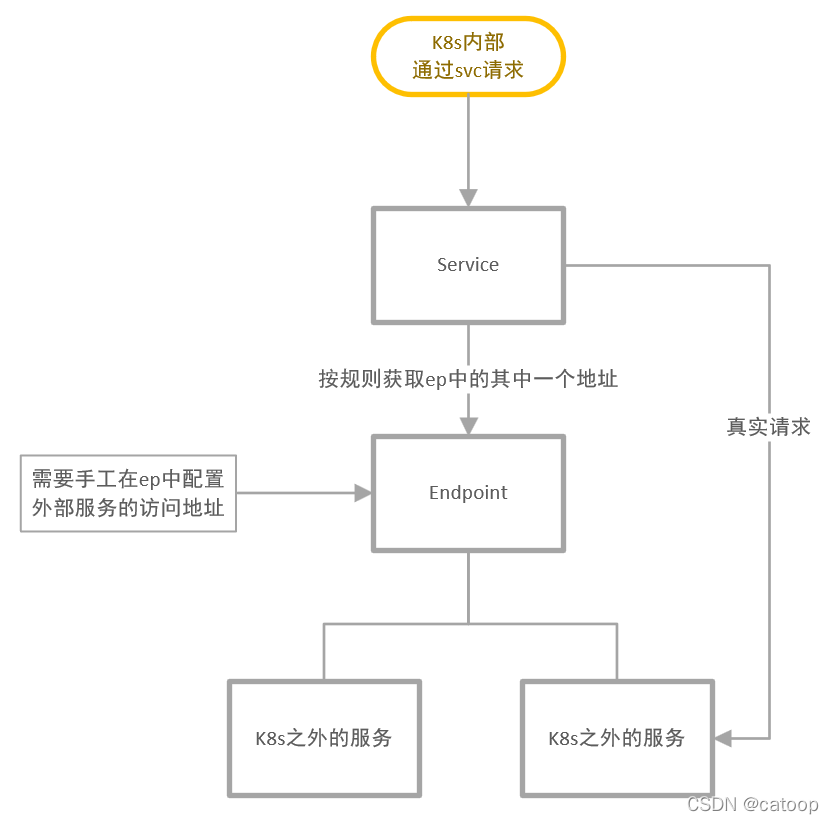
一、背景简介随着业务向云原生架构迁移,原有的监控系统需要升级以适应容器化环境。本系列文章介绍如何使用 Kube-Prometheus 监控 K8s 集群外部的主机和中间件服务。 核心特点: 支持监控 K8s 集群外部的服务(MySQL、Redis、RocketMQ 等) 通过环境标签(platform)区分不同环境的监控数据 基于 Prometheus Operator 的 ServiceMonitor 机制实现服务发现 二、技术原理2.1 K8s 访问外部服务K8s 集群内的 Pod 访问外部服务的原理: 关键步骤: 创建 Endpoints 资源,指向外部服务的 IP 地址 创建 Service 资源,不配置 selector,关联到手动创建的 Endpoints Pod 通过 Service 名称访问外部服务 2.2 ServiceMonitor 原理Prometheus Operator 通过 ServiceMonitor 实现服务发现: 工作流程: ServiceMonitor 通过 selector 选择目标 Service Prometheus Op...
2024-12-30
Redis集群监控配置-Helm部署方案
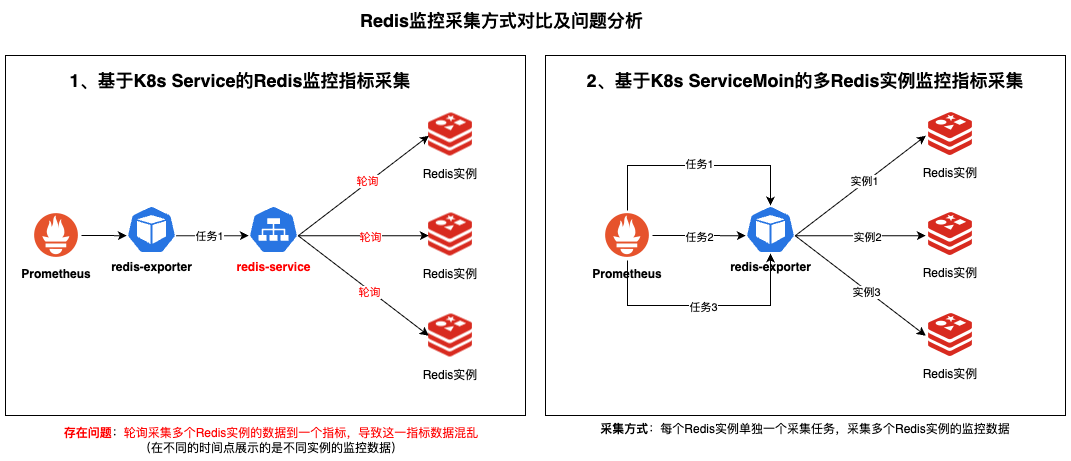
一、背景简介生产环境的Redis监控告警一直存在准确性问题,通过深入排查发现redis-exporter采集方式不正确,导致监控指标偏差和告警误报。为了解决这些问题,采用标准化的Helm部署方式来实现Redis集群监控采集。 核心解决问题: 修复Redis监控指标采集不准确的问题 统一Redis集群监控部署方式 提供安全的认证信息管理 支持多集群的灵活配置管理 本方案通过Helm部署redis-exporter实现Redis集群监控采集,确保监控数据的准确性和可靠性。 二、部署文件准备2.1. 必需文件清单 文件类型 文件名称 说明 Helm Charts prometheus-redis-exporter-6.9.0.tgz prometheus-redis-exporter chart部署包 配置文件 redis-exporter-values.yaml redis-exporter配置文件 版本说明: 推荐使用prometheus-redis-exporter 6.9.0或更新版本 Chart包包含了完整的Kubernetes资源定义 va...

2024-12-30
MySQL主从监控配置-Helm部署方案
一、背景简介生产环境的MySQL监控面临着部署复杂、标签不统一、管理困难等问题。传统方式中每个MySQL实例都需要单独部署一个exporter,部署方式繁琐,采集的指标标签不统一,无法在监控图表上快速检索查看。 核心解决问题: 简化MySQL监控的部署流程 统一监控指标标签格式 支持灵活的多实例监控管理 提供安全的认证信息存储 本方案采用Helm部署mysql-exporter实现MySQL监控采集,可以灵活增加mysql监控实例,大大简化了运维管理复杂度。 二、部署文件准备2.1. 必需文件清单 文件类型 文件名称 说明 Helm Charts prometheus-mysql-exporter-2.10.0.tgz prometheus-mysql-exporter chart部署包 配置文件 mysql-exporter-values.yaml mysql-exporter配置文件 版本说明: 推荐使用prometheus-mysql-exporter 2.10.0或更新版本 Chart包包含了完整的Kubernetes资源定义 values...
评论